Introduction
This document covers the basics of how networking works, and how to use different devices to build networks. Computer networking has existed for many years, and as time has passed the technologies have become faster and less expensive. Networks are made up of various devices—computers, switches, routers—connected together by cables or wireless signals. Understanding the basics of how networks are put together is an important step in building a wireless network in a community or neighborhood.
This module covers the concepts of:
- Clients and servers—how services such as e-mail and web pages connect using networks.
- IP addresses—how devices on a network can be found.
- Network hubs, switches and cables—the hardware building blocks of any network.
- Routers and firewalls—how to organize and control the flow of traffic on a network.
Reading through this material should take between half an hour to an hour. Exploring the activities and details of the subject with a group will take longer.
Clients and Servers
An important relationship on networks is that of the server and the client. A server is a computer that holds content and services such as a website, a media file, or a chat application. A good example of a server is the computer that holds the website for Google’s search page: http://www.google.com. The server holds that page, and sends it out when requested.
A client is a different computer, such as your laptop or cell phone, that requests to view, download, or use the content. The client can connect over a network to exchange information. For instance, when you request Google’s search page with your web browser, your computer is the client.
In the example below, two computers are connected together with an Ethernet cable. These computers are able to see each other and communicate over the cable. The client computer asks for a website from the server computer. The website is delivered from the server, and displayed on the client’s web browser.
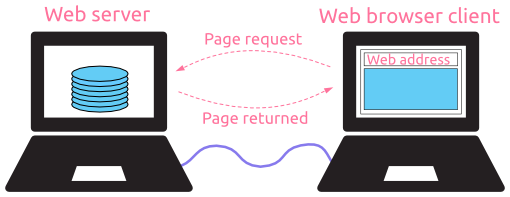
Most requests and content delivery on networks are similar to, or are based on, a client to server relationship. On a network, the server can be located almost anywhere, and if the client has the address, it can access the content on the server.
Activity: What is one real world example of a client and server relationship:
Switches
Switches are the foundation of most business networks. A switch acts as a controller, connecting computers, printers, and servers to a network in a building or a campus.
Switches allow devices on your network to communicate with each other, as well as with other networks, creating a network of shared resources. Through information sharing and resource allocation, switches save money and increase productivity.
There are two basic types of switches to choose from as part of your networking basics: managed and unmanaged.
- An unmanaged switch works out of the box but can't be configured. Home-networking equipment typically offers unmanaged switches.
- A managed switch can be configured. You can monitor and adjust a managed switch locally or remotely, giving you greater control over network traffic and access.
Routers connect multiple networks together. They also connect computers on those networks to the Internet. Routers enable all networked computers to share a single Internet connection, which saves money.
A router acts a dispatcher. It analyzes data being sent across a network, chooses the best route for data to travel, and sends it on its way.
Routers connect your business to the world, protect information from security threats, and can even decide which computers receive priority over others.
Beyond those basic networking functions, routers come with additional features to make networking easier or more secure. Depending on your needs, for example, you can choose a router with a firewall, a virtual private network (VPN), or an Internet Protocol (IP) communications system.
An access point* allows devices to connect to the wireless network without cables. A wireless network makes it easy to bring new devices online and provides flexible support to mobile workers.
An access point acts like an amplifier for your network. While a router provides the bandwidth, an access point extends that bandwidth so that the network can support many devices, and those devices can access the network from farther away.
But an access point does more than simply extend Wi-Fi. It can also give useful data about the devices on the network, provide proactive security, and serve many other practical purposes.
*Access points support different IEEE standards. Each standard is an amendment that was ratified over time. The standards operate on varying frequencies, deliver different bandwidth, and support different numbers of channels.
Wireless networking
To create your wireless network, you can choose between four types of deployment. Each deployment has attributes that will work better for different solutions.

No comments:
Post a Comment